
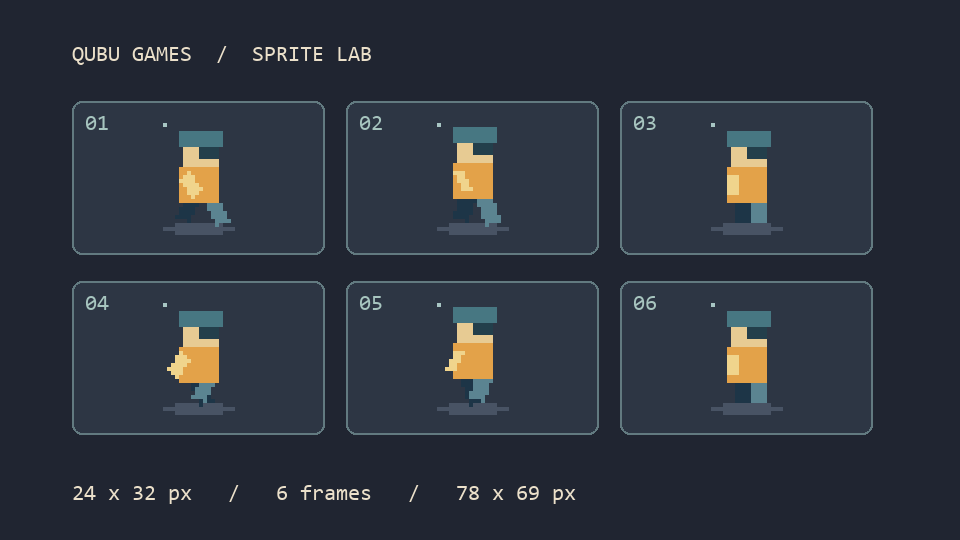
If step-10.png slips between step-1.png and step-2.png, a walk cycle can appear to skip a beat. The folder may look perfectly tidy. Check the order inside the sprite tool before spending time adjusting the animation speed.
We drew six small walking frames for this example. They make it easy to see both a frame out of order and a grid that is one pixel off. You can use the same files and compare the result in your own browser.
Download the six PNG frames and expected output (ZIP)
Check the order first
Unzip the sample and add the six PNGs from frames to the QUBU Sprite Sheet Generator. Arrange them as 1 → 2 → 3 → 10 → 11 → 12 using the arrows beside the frames if needed. When naming files for your own project, a leading zero such as step-01.png also helps when a program sorts names as text.
Where 78 × 69 pixels comes from
Set each frame to 24 × 32 px, with 3 columns and 2 rows. Use 2 px outer padding and 1 px frame spacing. Leave smoothing off and set the preview to 10 FPS.
Across the sheet, three frames take up 72 pixels. The two gaps add 2 pixels and the outer edges add 4, giving you 78. Down the sheet, two frames take up 64 pixels, with 1 for the gap and 4 for the edges. The finished atlas is 78 × 69.
Frame five should read {"x":27,"y":35,"w":24,"h":32} in the JSON. It is the middle cell on the second row. Check that entry if your second row appears shifted sideways or down. At 10 FPS each frame takes 100 ms, so all six take 600 ms.
Try one wrong setting on purpose
Open the atlas from expected in Slice sprite sheet mode. Keep the other settings and start with 0 spacing. That describes a 76 × 68 sheet. The source is 78 × 69, so the tool rejects the grid before cutting any frames. Put the spacing back to 1 and you can extract the six frames.
We checked the grid, coordinates and frame durations against the tool’s calculation code. We also cropped the packaged atlas at the recorded coordinates and compared the pixels with the six source PNGs. Try that check on a frame near the far corner of your own sheet. A bad gap can leave the first frame looking fine while pushing later frames further out of place.