
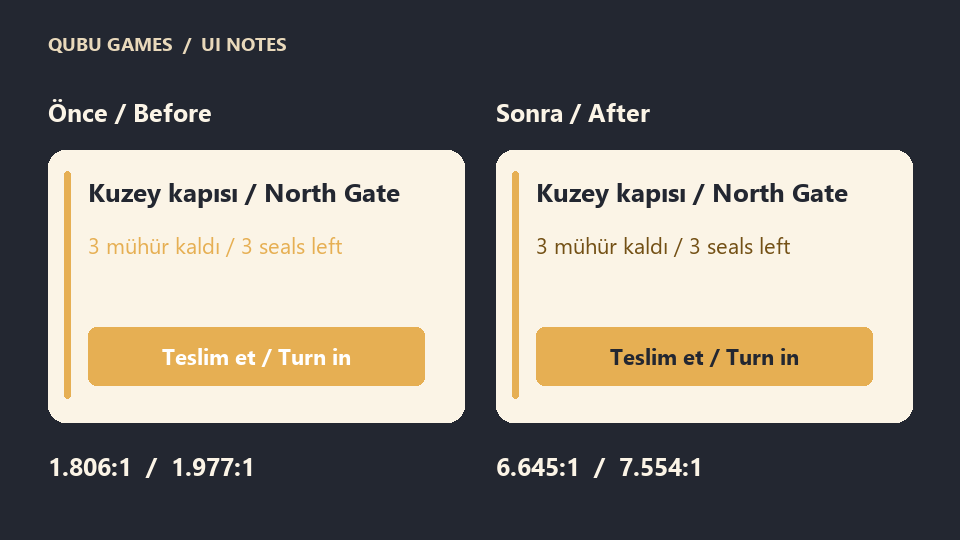
Picture a quest card with three things to read: “North Gate,” “3 seals left,” and a “Turn in quest” button. A honey-yellow stripe on the edge catches your eye. Put the same yellow on the cream background for “3 seals left,” though, and the line almost disappears. The detail the player needs most is the hardest one to read.
We made two versions of that card for this example. Both use the same dimensions and yellow accent. The difference is where the yellow goes.
Measure the small line first
For “3 seals left,” we measured #E6AF53 against #FBF4E6. QUBU’s palette tool calculates 1.806:1. WCAG 2.2 Level AA calls for 4.5:1 for normal text and 3:1 for text that meets its large-text definition. This pairing falls below both thresholds. W3C’s explanation of text contrast.
Switching the line to dark brown #735015 gives 6.645:1 against the same cream. The yellow stripe stays. The card still feels warm, and you can read the remaining count at a glance.
Keep the yellow button
The button fill is still #E6AF53. A white label measures 1.977:1. Set the label to #232731 and the ratio rises to 7.554:1. That fixes the label while keeping the button colour.
Try the same check on your own card
Download the quest card HTML and CSS example (ZIP). Unzip it and open quest-card.html in your browser.
Open the QUBU Game Color Palette Generator. Compare the small text with the card background first. Then compare the button label with the actual button fill. If the background is an image, inspect the light and dark areas underneath the text. A ratio measured against one solid colour cannot describe every point on a patterned background.
One last check has nothing to do with hex codes. When the quest is ready, show “Ready to turn in” as well as changing the stripe colour. A player who cannot distinguish the colours can still read the state. These ratios cover the text pairs in this example. Check the focus indicator, button boundary and other states separately.